From a BOQ line back to model elements
A workflow guide for preparing and reviewing a BOQ. It describes professional checks and does not promise automatic recognition, compatibility or a connection that has not been verified for the project.
Check the source
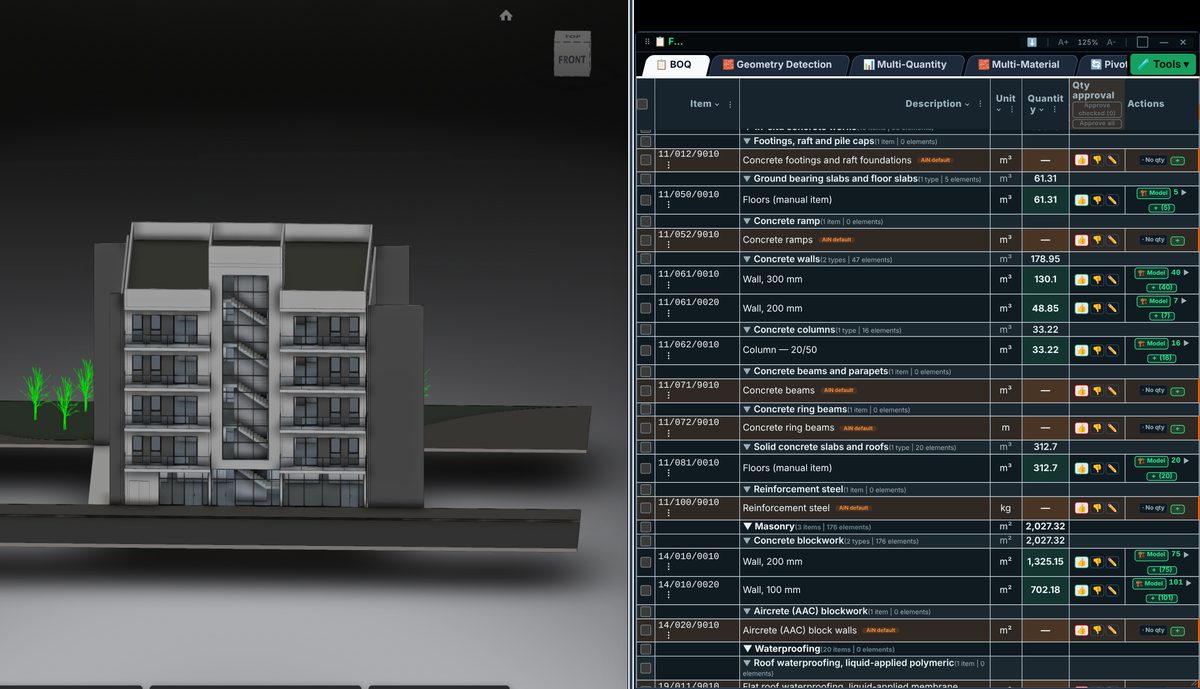
A line link allows reviewers to examine the measured part of a building. Check the element set against the item description, levels and categories. The presence of a link does not prove that every required element was selected.
Incorporate the data
The link applies to model-based lines. Supplementary lines need another checkable source. Not every tender activity has a geometric model representation; keep that distinction when issuing the BOQ.
Review before issue
Before a revision update, check whether element IDs persist and the group still represents the same work. Replacement or splitting of elements can change the link basis even where the overall building looks similar.
Review checklist
- Identify the source file and revision.
- Record the unit and measurement rule, and check scope boundaries.
- Distinguish model data, manual completion and AI suggestions.
- Record missing data or exceptions before using a quantity for pricing.