
Construction logic and measurement rules, applied consistently. AI assists with classification, mapping and calculation. It never approves a quantity.
BOQ directly from a Revit model to Excel
BOQ export to Microsoft Excel files
The model holds the building. AiN turns it into measurable work. From BIM objects to construction quantities, and out to Excel, so quantity surveyors, contractors and tender managers can review quantities faster, clearer and with better control.
- See everything that exists in the model.
- Every row based on the model links back to the elements it was derived from.
- Click a row and see what it represents in the model.
Concrete has the highest level of automation today. Other trades can already be produced in the system, with more mapping and manual completion. Every output requires QS or engineering review before commercial use.
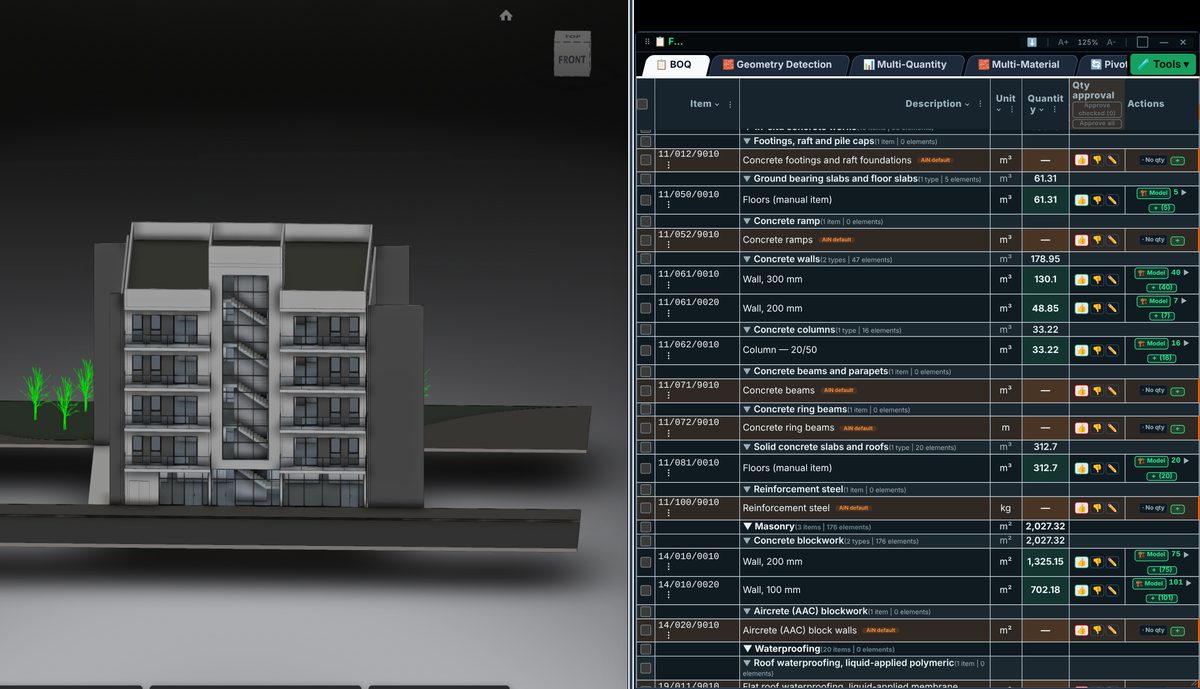
A BOQ straight from your Revit model
Open the model and the bill of quantities side by side. AiN reads geometry and quantity data from Revit and Navisworks models and organizes it into BOQ lines by trade. Geometry calculations are consistent: the same model always returns the same result. Concrete works have the highest level of automation; the other trades run in the same workflow, with more mapping and manual completion.
Mapping to BOQ items uses Object-Oriented AI and Semantic Enrichment: the AI reads a building object, not pixels and not lines, and understands what it is made of and what that means for the work. AI assists with classification, mapping and calculation; every quantity it produces is marked with its source, and it never approves a quantity. The QS remains in control: every suggestion can be reviewed, corrected and approved before it is used commercially.
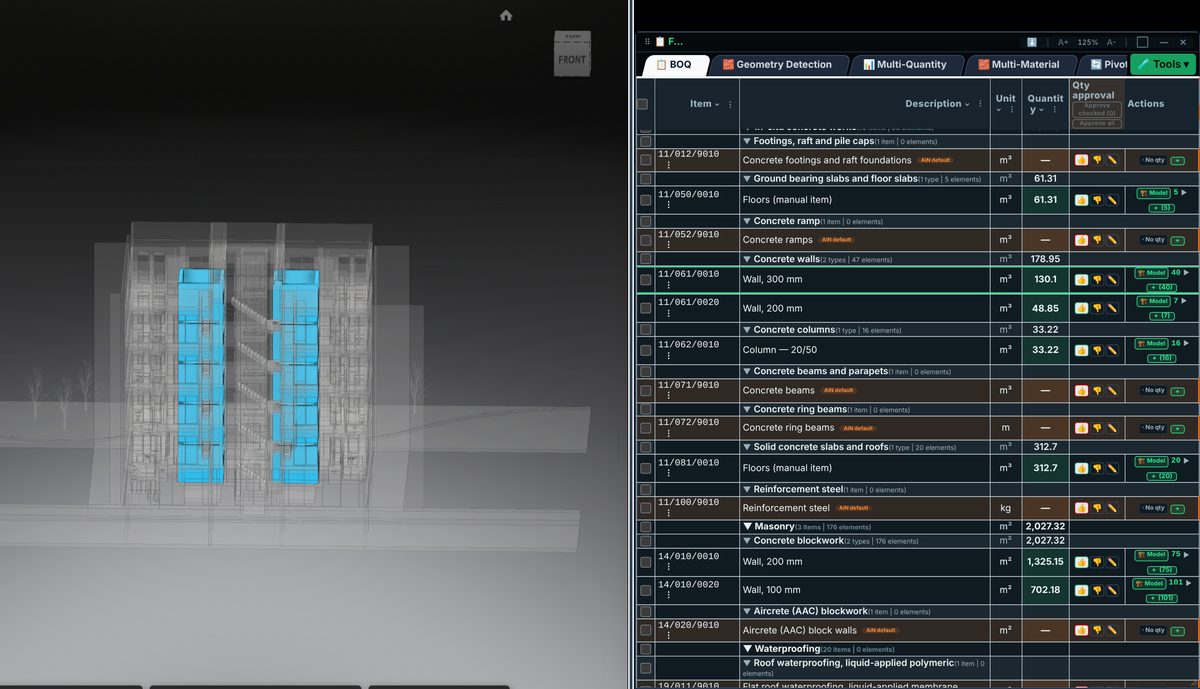
Click a BOQ line. See what it represents in the building.
Every model-based quantity stays connected to the elements it came from. Select a line and its elements are isolated and coloured in the 3D model, so a quantity is checked against the building, not just against a number. It works the other way as well: select elements in the model and assign them to a line.
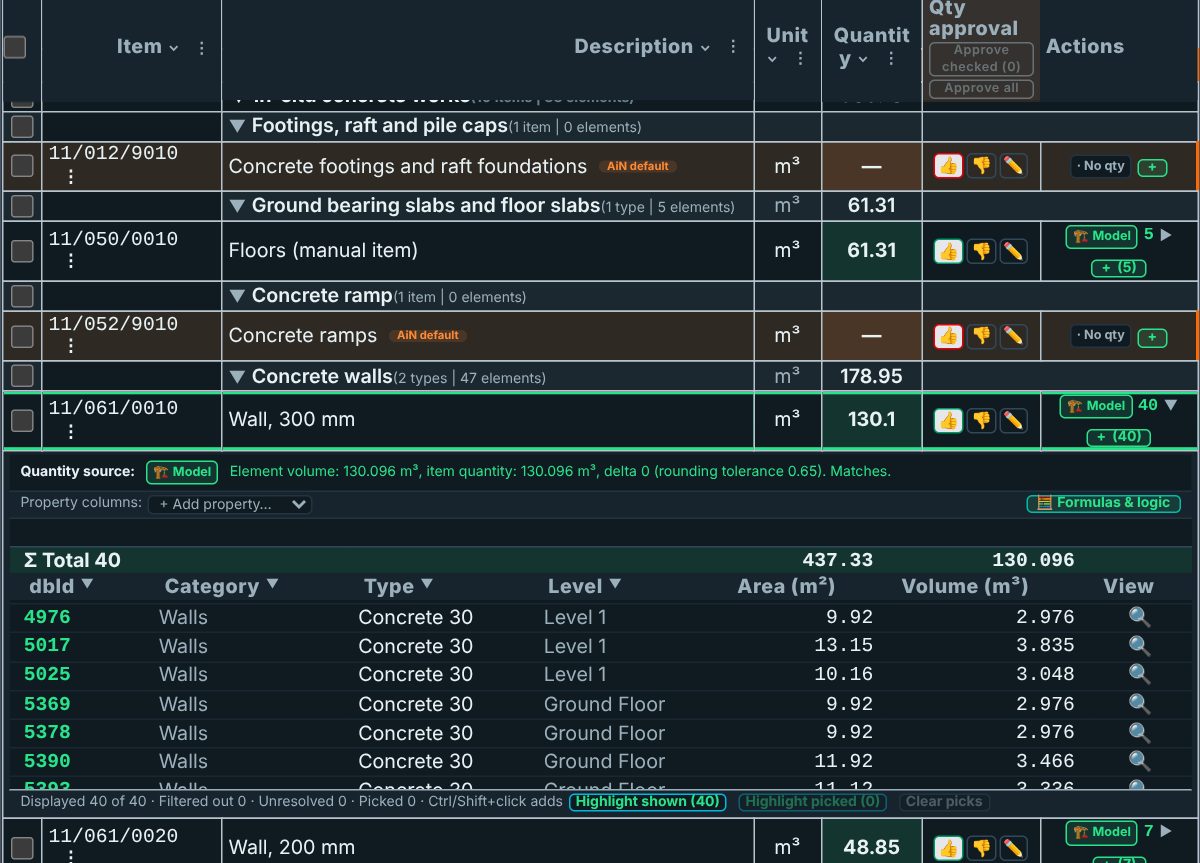
See where every quantity comes from. Then export to Excel.
Each line shows its quantity source, and lines that do not come from the model are marked. Open a model-based line to see the elements behind it, with their measured values and a check of the line quantity against them. Anything not present in the model can be added manually, and is marked as such. The system surfaces specification gaps and missing data early, so the quantity surveyor sees them before they reach the site.
The output is a structured Excel workbook with quantity sources, review status and model references where available. It gives the project team a clearer basis for checking quantities, comments and tender decisions.
Every number carries its source.
Every model-based quantity stays connected to the elements it came from. Everything else is labelled.
Not every line in a bill of quantities comes from the model. Some quantities are measured by hand, some are taken from a specification, and some are suggested by AI. AiN keeps those rows in the BOQ and keeps them marked for what they are. An AI suggestion stays a suggestion until a person approves it.
No quantity without a declared evidence status.
Built from real quantity surveying work
AiN is built from real field work: BIM models, BOQ files, specifications, Excel sheets and tender workflows. The goal is to give quantity surveyors and tender managers a clearer, model-linked review process.
AiN was officially published on Autodesk App Store on 12 May 2026.
View on Autodesk App Store
What works today
The entire BOQ preparation process can be carried out in the system. Not all of it is automated. Concrete from Revit and Navisworks models has the highest level of automation today. Other trades are produced using model data, mapping, editing, manual completion and user approval. Every output must be reviewed by a professional QS or engineer before commercial use.
- 1. Concrete — highest level of automation today
- 2. Finishes, MEP, rebar — can be produced, with more mapping and manual completion
- 3. Geometry — consistent calculation. AI assists classification, mapping and calculation; approval stays with a person
- 4. Every output requires QS approval before tender or invoice use
How it works
Revit, Navisworks, IFC or Excel based on project availability.
Quantities, elements, chapters, items, Quantity Facts and exceptions. Whatever is missing from the model is completed manually and flagged. Every suggestion is human reviewed.
BOQ, quantity sources, review status and links back to the model. Suggested, in review, approved.
What you get
- 1. BOQ organized by chapters
- 2. Quantity Facts from the BIM model
- 3. Row linked to model elements
- 4. A declared evidence status for every quantity
- 5. Excel Evidence Workbook
- 6. Status: suggested, in review, approved
- 7. Exceptions and gaps report
- 8. Foundation for tender and payment control
- 9. Manual rows, quantities, prices and notes, clearly separated from model data
Who it is for
Pain: no early budget certainty.
Value: spot gaps and exceptions before tender and execution.
Pain: BOQ, model and payment claims do not talk to each other.
Value: BOQ linked to model and to evidence.
Pain: manual measurements, bloated Excel, repeated checks.
Value: automation, control and a deliverable Excel.
Single project pilot
Includes: review of existing models, initial quantity extraction, linked BOQ, Excel Evidence, a review meeting, gaps and exceptions report.
This is not BIM viewing. From model to quantity — and back.
Want to see this running on a real model?